


Aspire Account Center
3.3969.00 Reviews
App Specs
- Version
- 4.22.47-6102
- Updated On
- License
- Free
- Downloads
- 500,000+
- Developer
- Atlanticus Services
- Categories
- Finance
- Platform
- Android
Screenshots

 Analysis by AppCompare
If you have an Aspire credit card and want a simpler way to keep an eye on it, Aspire Account Center is a practical place to begin. I found its purpose easy to understand: it brings card management into a dedicated finance app instead of making me rely on a browser tab or search through unrelated banking tools. It is free, suitable for Everyone, and developed by Atlanticus Services.
My overall impression is that this is a utility app rather than a complete personal-finance system. It is most useful when I need to check card information, review activity, or take care of routine account tasks from my phone. It does not try to replace a budgeting app, a full bank dashboard, or a broad money-management service. That narrow focus is both its main strength and its main limitation.
What to expect before you begin
The first thing I would tell a new user is to approach Aspire Account Center as a companion for an existing Aspire credit-card relationship. The app is not presented as a general marketplace for financial products, and it is not the kind of tool I would install simply to track every account I own. Its value starts when I already have an Aspire card and want a direct mobile route to the account behind it.
The app belongs to the Finance category and has reached more than half a million installs. Its average rating is 3.3 from roughly two thousand ratings, with close to one thousand written reviews. Those figures suggest a mixed experience rather than universal approval, so I would keep expectations realistic: the app can make card administration more convenient, but convenience depends on a smooth sign-in and on the account information being presented clearly on the particular device.
One useful distinction is between checking an account and managing money overall. Aspire Account Center can serve the first purpose well because it keeps the card relationship in one place. For the second purpose, I would still use a separate budgeting method if I wanted categories, spending targets, savings planning, or a combined view of several institutions. Installing this app will not automatically turn credit-card activity into a complete financial plan.
The current release is version 4.22.47-6102, and the app runs on Android 6.0 or later. That makes it accessible on many older Android phones, which is helpful if I do not use a recent device. At the same time, an older operating system can make any finance app feel less comfortable than it does on a current phone, especially when typing account details or moving between screens.
Because it is free, the decision to try it is straightforward for an eligible cardholder. I would still install it from the official app marketplace and check that the developer shown there is Atlanticus Services before entering any account information. That small habit matters more with a finance app than it does with a casual game or a weather widget.
Worth Reading Before You Choose

EA SPORTS FC Mobile 26 Is a Bigger Football Game, but It Takes Time

Flipboard Shows What News Apps Must Do Beyond the Feed

Switching to Android Auto Means Rethinking Your Driving Routine

Google Calendar Makes a Crowded Week Easier to Manage

Ludo King Makes the Most of the Minutes Between Plans

Baby Panda World Brings Quick Play to Modern Phones, but Its Game Library Feels Busy
Setting it up without making the process harder
I would start with my Aspire card and the account information I normally use to access it. Having those details ready is more useful than opening the app while distracted, because the first meaningful goal is not browsing every screen; it is reaching the correct account and confirming that the information belongs to me.
During setup, I would read each prompt carefully rather than rushing through it. A credit-card app is not the place to guess at a username, reuse an old password incorrectly, or assume that a failed sign-in means the card itself has a problem. If the first attempt does not work, I would pause and use the account-recovery route offered within the normal sign-in flow instead of repeatedly submitting guesses.
My practical tip is to complete setup when I have a few quiet minutes and a reliable connection. The app’s most important job is account access, so a rushed first attempt can create confusion that has nothing to do with the app’s day-to-day usefulness. I would also avoid setting it up on a shared phone, since a finance account deserves the same care as any other private service.
Once I am signed in, I would spend a moment identifying the main account screen and the area showing recent card activity. That short orientation pays off later. If I open the app in a shop or while checking a statement, I want to know where the relevant information is instead of tapping randomly through menus.
A first-time user may wonder whether the app replaces the card issuer’s other account channels. I would think of it as an additional mobile access point, not as a reason to abandon every alternative immediately. Keeping the usual account-access method available until the app feels dependable is sensible, particularly if I need to handle an important payment or resolve an urgent account issue.
The first successful action I would try
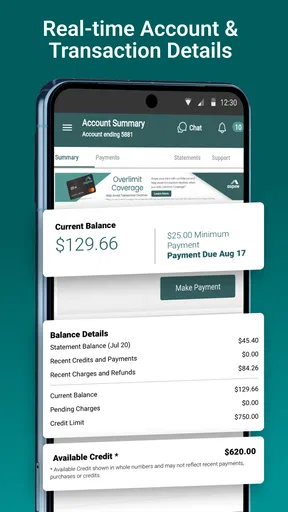
For me, the first successful action would be confirming a recent card transaction. It is a small task, but it proves that the app is connected to the right account and that the information I need is visible. I would open the activity area, find a purchase I recognize, and compare its details with the receipt or notification I already have.
This simple check is more valuable than merely seeing a welcome screen. It answers several practical questions at once: did I sign in to the intended account, is the activity current enough for my needs, and can I find information quickly when I need it? If the transaction is present and recognizable, I have a useful reason to return to the app.
A realistic everyday example would be buying groceries on the way home and later wanting to confirm that the card activity reflects the purchase. I would open Aspire Account Center, check the recent activity, and then close it once I have the confirmation. That workflow is faster and less distracting than opening a full desktop site, especially when I only need a quick look.
I also like this as a low-risk first test because it does not require me to change anything important. Before attempting a more consequential account action, I can learn how the app presents dates, amounts, and transaction descriptions. If the display is easy to follow, the app becomes more useful for routine monitoring. If I find the presentation unclear, I learn that early rather than discovering it during a time-sensitive task.
Another worthwhile habit is to use the first session to establish a checking routine. I would not open the app constantly, but I might review activity after a significant purchase or before reconciling my monthly spending. The goal is to use the app as a focused checkpoint, not to turn every phone interaction into a financial worry.
Where new users may become confused
The most common source of confusion with a card-center app is expecting it to show more than the card account itself. If I have checking, savings, another credit card, and investment accounts elsewhere, I should not assume that Aspire Account Center will combine them into one financial picture. Its focused design is helpful for Aspire card administration, but it is not a substitute for an aggregator or a personal budgeting tool.
I would also separate account activity from a final statement. A recent purchase may appear in an activity view before I have the complete context of a billing cycle. For careful planning, I would compare what I see in the app with the statement information available through the account. That is especially important when I am trying to understand a balance rather than simply verify one purchase.
Another point worth remembering is that mobile access does not remove the need for judgment. Seeing a transaction does not automatically tell me whether it fits my budget, whether a recurring charge is still wanted, or whether a merchant description is familiar enough to ignore. I would use the app to gather the account information, then make the financial decision separately.
If the app feels slow or a screen does not load as expected, I would first check the basics: connection quality, app version, and whether the phone meets the minimum Android requirement. I would avoid repeatedly tapping a control that appears unresponsive, particularly around account actions. Waiting briefly and checking the result is safer than accidentally submitting the same request more than once.
Privacy is another reason to keep the phone itself protected. I would use a device lock and avoid handing an unlocked phone to someone else while the account is open. The app is free, but that does not mean the information inside it is casual. A little care around the device is part of using any credit-card management tool responsibly.
How it compares with the usual alternatives
The obvious alternative is using a mobile browser to reach the same account. A browser can be more flexible, especially if I already manage several services there, but a dedicated app is easier to find when I need a quick account check. I do not have to remember which browser tab contains the account, and the experience feels more focused on the card rather than on the wider web.
A second alternative is a general finance app. Those tools are usually better when I want a combined view of spending, accounts, budgets, or financial goals. They may reduce the need to switch between institutions, but they can also make a specific card task feel buried among unrelated information. Aspire Account Center makes more sense when direct card access matters more than a broad financial dashboard.
There is also the traditional desktop experience. I would prefer a larger screen for reviewing a long statement or carefully comparing several months of activity. For quick checks, however, the phone app is more convenient. The trade-off is clear: the app favors speed and accessibility, while a browser or desktop view may be more comfortable for detailed review.
That comparison helped me define the right user. I would recommend trying it to an Aspire cardholder who regularly checks activity from an Android phone and wants a dedicated route to the account. I would be less enthusiastic for someone who does not have an Aspire card, wants one app for every financial institution, or needs advanced budgeting and reporting.
Small habits that make the app more useful
My first tip is to use a two-step verification habit for important purchases: check the transaction in the app, then compare it with the receipt or order confirmation. This catches simple mistakes, such as confusing two similar merchant names, without turning every unfamiliar description into an immediate dispute.
My second tip is to treat the app as a monitoring checkpoint rather than a complete record-keeping system. If I am preparing a monthly budget, I would take the relevant information from the card account and place it into the system I use for all spending. That avoids the common mistake of assuming that one card view represents my entire financial position.
My third tip is to learn the layout before an urgent situation. I would open the app on a normal day, locate the account overview and recent activity, and make sure I understand the route back to the main screen. This is a small investment, but it reduces stress when I am checking a purchase away from home.
A less obvious trade-off is that focused apps can encourage focused attention. That is good when I need a card detail quickly, but it can also tempt me to check the account without considering the wider budget. I would pair the app with a weekly or monthly review of all spending, so quick card checks support my finances instead of replacing proper planning.
If I were helping a family member start, I would explain the first goal in plain language: sign in, find the account, and confirm one familiar transaction. I would not begin by exploring every available screen. That approach makes the app feel manageable and gives the new user a clear sign that setup has worked.
My final recommendation for a first-time cardholder
After using it as a focused account tool, I see Aspire Account Center as a sensible choice for people who want convenient mobile access to their Aspire credit cards. Its free price and broad Android compatibility make trying it easy, while the dedicated design keeps routine card checks from getting lost inside a larger finance platform.
The limitations are just as important. I would not choose it as my only financial app if I needed cross-bank budgeting, detailed spending analysis, or a unified view of several accounts. I would also keep a browser or another account-access option available until I was comfortable relying on the app for important tasks.
For the right person, the path to value is short: install it, sign in carefully, identify the correct account, and verify a recent purchase. From there, occasional checks can make card activity easier to follow. The best reason to use Aspire Account Center is direct, everyday control of an Aspire card—not a promise of complete money management.
That is why my recommendation is specific rather than universal. If your main need is a clean mobile checkpoint for an Aspire card, I think it is worth trying. If your main need is a full financial command center, I would look toward a broader alternative and use this app only for the card-specific details it is designed to handle.
Pros
- Centralizes account details
- cards
- and transactions in one place.
- Provides quick access to balances and recent account activity.
- Makes it easier to manage multiple Aspire products.
- Digital account tools reduce the need for paper statements.
- Useful notifications can help users monitor account changes.
Cons
- Some features may depend on the user’s Aspire account type.
- Requires internet access for most account-management functions.
- Login or verification steps may feel slow at times.
- Limited usefulness for people without an Aspire account.
- Support options may not be available directly for every issue.
FAQs for Aspire Account Center
What is Aspire Account Center used for?
Aspire Account Center is designed to give Aspire customers a central place to manage account-related information and services. Depending on the Aspire product you use, it may let you review account details, update personal information, access support resources, monitor activity, and manage selected settings. The exact features can vary by region, account type, and the services enabled for your profile.
Do I need an Aspire account to use Aspire Account Center?
Yes, access generally requires an eligible Aspire account and valid sign-in credentials. New users may need to complete registration or activate their account before using the platform. During setup, the service may request information needed to verify your identity. If you already have Aspire services, use the official registration or login process rather than creating duplicate accounts, which could make account management more complicated.
Is Aspire Account Center safe for managing personal information?
Aspire Account Center is intended to provide a secure way to access and manage account information, but users should still follow basic security practices. Download it only from an official app store or Aspire website, keep the app updated, use a strong and unique password, and avoid signing in on shared devices. Never disclose verification codes or login details to people claiming to be support agents.
What should I do if I cannot log in to Aspire Account Center?
If login fails, first check that your email address, username, or other sign-in details are entered correctly and that your internet connection is working. Use the official password-recovery option if available, and make sure the application is updated. Repeated failed attempts may temporarily restrict access. If recovery does not work, contact Aspire through its verified support channels and provide only the information required to confirm ownership.
Does Aspire Account Center support all Aspire services and devices?
Support can depend on the Aspire service, account category, country, and the version of the application or website you are using. Some functions may be available only through the web portal, while others may appear exclusively in the mobile app. Before downloading, check the official store listing for compatible Android or iOS versions and review the permissions requested. Feature availability may also change through future updates.


